 Are you tired of hearing how "simple" it is to deploy apps with Docker Compose, because your experience is more one of frustration? Have you read countless blog posts and forum threads that promised to teach you how to deploy apps with Docker Compose, only for one or more essential steps to be missing, outdated, or broken?
Step Zero: Remember the KISS principle
Because, in computing, all good lists start at zero, not one. 😊
The KISS or (Keep It Simple Silly) principle is the first thing to focus on. It might seem a little strange to start with a general principle, rather than installing the runtime of your preferred software language (e.g., PHP, Go, or Rust), installing a web server, or learning the HTTP spec (perhaps).
But, principles are the foundation upon which we build. Without them, we're, metaphorically speaking, building on very shaky foundations.
The reason that I recommend the KISS principle, specifically, is because the greater complexity of your web application, the more you have to learn, know, debug, and maintain. And, as with just about everything else in life, the greater something's complexity, the greater the likelihood of something going wrong.
And, when you're just getting started, something going wrong is the last thing you want. Because at this point you want to have a win, a feeling of success and achievement, as quickly as possible.
Therefore, don't add or use something if you don't absolutely need it!
Step One: Set up your development machine
Naturally, if you're going to build a web application, you're going to need a development machine. There's no getting around it. But, before you start thinking that you need to race out and buy a fancy new machine, perhaps even a MacBook Pro — stop!
To be fair, the new MacBook Neo range offers exceptional value for the price, and I sure wish something like that was around when I was first starting out back in the late 90's.
But, I digress. An old or second-hand development machines will do just fine. Seriously.
If you don't know where to get a new machine from, here are some suggestions:
- Do you know someone who's about to buy a new machine?
- Have you looked on sites such as eBay, Craigslist, or other marketplaces?
- Have you contacted the schools, universities, or industry training organisations in your local area? These organisations periodically refresh their computer hardware and can offer to sell you their outdated hardware for a very reasonable price.
- Have you contacted businesses in the local area, asking them if they have hardware that they're getting rid of for a reasonable price.
All of the above could be a good solution for buying a good enough computer for a fair price, potentially saving your hundreds.
Regardless of how you acquire a development machine, however, when you get it, any operating system will do. Go with what you know and are most comfortable with. Then, only install the software that you need. I suggest that this might only need to include the following:
- The language runtime, e.g., PHP, Go, Rust, Python, Ruby, C#, Java, Kotlin, etc.
- Your software language's package manager, if it doesn't come with the language runtime, e.g., Composer for PHP, RubyGems for Ruby, or Pip for Python.
- A build tool (if required). This is, mainly, only applicable if you're using Java.
- Your preferred code editor or IDE. Some good ones that I've used and recommend are any of the JetBrains suite of IDEs, Neovim, Sublime Text, Geany, and Visual Studio Code.
- Git or your preferred version control software (such as Mercurial), if you're not a Git user
- Linux via Windows Subsystem for Linux (WSL) if you're running Windows
I'll update this list as and when I think of more absolute essentials.
A special exemption: if you're experienced with Docker/Docker Compose, and/or BSD Jails, feel free to use them. But, don't feel that you need to. That said, they will let you keep your development machine more organised, unless you're a particularly organised person.
Step Two: Build an ultra-simple web app
Now that you're development machine is ready, it's time to build your first web application. As with all of the previous steps, don't do anything more than you absolutely need to, such as using template engines and JavaScript — especially not a database.
Using either Sinatra (if you've chosen Ruby) or otherwise a Sinatra-inspired framework, build a small web application that has a single route that only accepts GET requests and returns either some JSON or a basic HTML response.
Here's an example of doing that using the Slim framework (because I've used primarily used PHP for the majority of the last 25-odd years).
<?php

declare(strict_types=1);

use Psr\Http\Message\{ResponseInterface,ServerRequestInterface};
use Slim\Factory\AppFactory;

require __DIR__ . '/../vendor/autoload.php';

$app = AppFactory::create();

$app->get(
    '/',
    function (
        ServerRequestInterface $request,
        ResponseInterface $response,
        array $args,
    ) {
        $ccurrentDate = new \DateTimeImmutable();
        $response->getBody()
            ->write(
                sprintf(
                    "The date, at the moment, is %s",
                    $ccurrentDate->format("d-m-Y"),
                ),
            );
        return $response;
    },
);

$app->run();
Then, launch it:
php -S 0.0.0.0:8070 -t ./public
After that, make requests to the default route, whether with your preferred web browser, or a command-line utility such as curl or Resterm
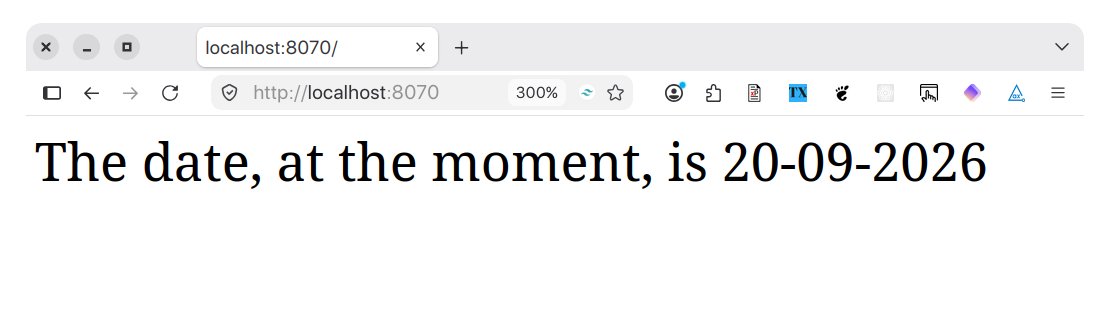
Then, refactor the default route to retrieve path and query parameters to have the app be a bit more meaningful, such as in the following example.
<?php

declare(strict_types=1);

use Psr\Http\Message\{ResponseInterface,ServerRequestInterface};
use Slim\Factory\AppFactory;

require __DIR__ . '/../vendor/autoload.php';

$app = AppFactory::create();

$app->get(
    '/{name}',
    function (
        ServerRequestInterface $request,
        ResponseInterface $response,
        array $args,
    ) {
        $ccurrentDate = new \DateTimeImmutable();
        $response->getBody()
            ->write(
                sprintf(
                    "Hello %s. The date, at the moment, is %s",
                    $args['name'],
                    $ccurrentDate->format("d-m-Y"),
                ),
            );
        return $response;
    },
);

$app->run();
You can see that it retrieves a variable called name from the path and prints it in the HTML response.
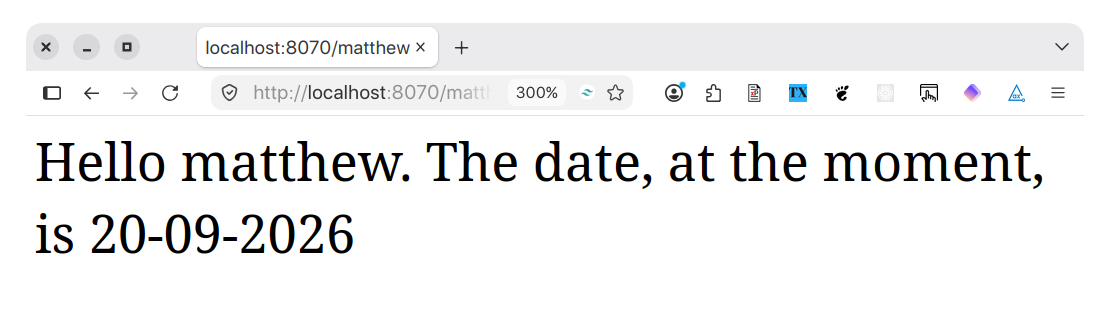
Now, you've built your first web application. Sure, it's not the flashest thing in the world. Okay, it barely does a thing. But, you've built a web app. And, if you're anything like me when I started building web apps (and I hope you are!), this will still be (at least somewhat) exciting!
From here, you move on to step three.
Step Three: Learn the foundational knowledge that underpins web application development
Now that you've built your first web application, as simple as it is, but before you start building another one, or augmenting the functionality of the first one, it's time to grow your foundational knowledge.
Specifically, it's time to learn about three core topics:
- HTTP: Focus on the different request methods (i.e., GET, POST, PUT, PATCH, DELETE, etc), HTTP messages, redirections, media types, and Cookies. Dive in as deep as you want beyond this, if you're really keen to learn all about it. But if you do nothing more than learn these core elements, you'll be off to a good start.
- HTML & CSS: You need to get a good handle on these two technologies to build good web apps. There's a lot to learn, to truly master them, but if you learn the essentials, you can progressively build on your knowledge over time.
- JSON & XML: As with HTML & CSS for web apps, you'll need one or both of JSON and XML for APIs. In my experience, I've used JSON far more with APIs. But it's helpful to learn both, as they're so universally used.
Step Four: Augment the ultra-simple web app
Now, it's time to revisit the initial version of the application that you wrote, and start to implement your foundational knowledge. I'm not suggesting that you implement all of what you learned, just because you learned it. Rather, think about interesting and challenging ways that you could make use of that knowledge, and refactor the application accordingly.
For example:
- Add routes that support POST, PUT, PATCH, and DELETE requests, effectively turning the app into a small CRUD application. You would have to implement your own data source, perhaps a JSON, CSV, or XML file as well as a little bit of file editing code.
- Integrate a template engine, and render the output of one or more of the application's routes using it. There are far too many to mention, but here are notable templating engines: EJS, Go's template package, Haml, Handlebars, Jinja, Mustache, Twig
- Perhaps experiment with a front-end language and framework. For example, you could use Vue.js, React, Svelte, or Next.js
Step Five: Build your first CI/CD pipeline and deploy your app
Now that you've gained a good amount of foundational knowledge — along with some experience — it's time to share your application with others, by learning how to automate the deployment process.
To do that, you need to build a CI/CD (Continuous Integration and Continuous Deployment) pipeline. To do that, in addition to reading through some foundational documentation on the topic, take a look at both professional platforms and tools. Some good examples are GitLab CI, GitHub Actions, Deployer (for PHP), and Capistrano.
The pipeline doesn't need to be all that special. But, at the very least, it should:
- Perform some basic tests on your code, such as code quality and linting to check that the code is valid and will compile with one or more versions of your language, e.g., PHP 8.4 and 8.5
- Check that your code has a README, which should provide a basic overview of the project and a getting started guide for new users
- Perform a basic checkout of the code and deployment to your hosting provider
If you want to learn about configuration management tools such as Puppet, Salt, Chef, and Ansible, feel free. But, don't feel the need to, as there is still so much to learn before they make a lot of sense, and before they are something that you'll need to know about.
In addition, get some basic knowledge of and experience with DNS, primarily around A, CNAME, NS, and text records.
You might also benefit from investing in learning Docker, if you're using a platform such as Fly.io. If you're not sure where to start, check out the free book that I wrote, called Deploy with Docker Compose.
In addition, getting a basic understanding of Linux systems administration will likely come in super-handy, as a majority of web applications and APIs are deployed to Linux servers or Linux-based containers.
For a deployment server, there are numerous options to choose from. However, some good ones are Linode and Hetzner.
Step Six: Add database support
Finally, it's time for the final step: database support.
Few web apps and applications are complete without a data source of some kind, and a flexible and powerful one at that. A web app's data source doesn't, necessarily, need to be sophisticated. It could be a JSON, CSV, Text, or XML file, for example.
Any of these could be stored alongside the application, perhaps in the same filesystem. Up to a point, they'd likely be quite fast and responsive. However, alongside these benefits, they have a couple of noteworthy, potential, disadvantages:
- If your application requires more than one web server, how do you make the file available to each web server? You could sync copies between each web server using rsync, but that could be tedious. You could have the web servers share a filesystem, such as NFS, but I don't know if there would be performance implications that might negate any benefits. You could store the file in an AWS bucket and have each web server read and cache the file. But, regardless of how you store and maintain the file, how do you ensure that any changes to the file are seamlessly synced to each web server?
- How do you maintain text files? CSV and Text files, to a point, are pretty easy to maintain. However, doing so, even with powerful text editors and IDEs, or apps such as LibreOffice of Excel gets old quickly! Even updating JSON, to a point, is okay with a text editor. But you'll find that tedious very quickly. And let's not get started on editing XML.
While there are available solutions to both the writing and syncing challenges, sometimes it's not worth it, when a better solution, such as a database, already exists.
So, for sakes of simplicity, if nothing else, that's why I recommend that you begin integrating a database into your application. Ideally, keep it simple, though, by using SQLite instead of the client/server focused databases such as MySQL, PostgreSQL, etc, which require more time and effort to set up.
While some people might decry SQLite as a poor choice in comparison to said other databases (or, alternatively, a vector or graph database), SQLite can be super-performant!
So, start adding database support by:
- Ensuring that your software language of choice has support for SQLite
- Install a database tool such as the SQLite Command-Line Shell or Adminer
Then, refactor the earlier application to:
- Retrieve information from the database and render that information in a tabular list
- Add new records and edit existing records with a form
- Delete existing entries by clicking a link
While there are a lot of topics you could design a database around, how about the following suggestions:
- Your favourite movies, books, TV shows, or plays. For example, Marvel movies, Batman movies, or the collected works of William Shakespeare, Dr. Seuss, Leo Tolstoy, James Patterson, or Stephen King.
- A list of countries ranked by wealth disparity, quality of education and/or healthcare, or cost of living.
As an example, let's say that you created a small database to track your book collection, as you have a so many that you don't know what to do with them. You can find a simplistic schema for it below.
-- Enable Write Ahead Logging for performance
PRAGMA journal_mode=WAL;

-- Enable Foreign Key support
PRAGMA foreign_keys = ON;

-- Define the book table that tracks the core book details
CREATE TABLE IF NOT EXISTS book (
    name TEXT NOT NULL,
    synopsis TEXT NOT NULL,
    genre TEXT NOT NULL,
    isbn TEXT NOT NULL,
    num_pages INTEGER NOT NULL,
    book_type TEXT NOT NULL,
    author_id INTEGER NOT NULL,
    -- Limit the values that the book_type column can be set to
    CHECK (book_type = "hardcover" OR book_type = "paper back"),
    -- Define a foreign key on author_id
    FOREIGN KEY(author_id) REFERENCES author(rowid)
);

-- Define an index on the book table
CREATE INDEX IF NOT EXISTS
idx_book_name_synopsis_genre ON book (name, synopsis, genre);

-- Define the author table to track author details
CREATE TABLE IF NOT EXISTS author (
    author TEXT NOT NULL,
);
With the schema defined, you could run the following SQL query in your book list page to get the book's unique ID, name, synopsis, genre and type, along with the author's name, where the results are sorted in ascending order of the book's name.
SELECT FROM book b (b.rowid, b.name, b.synopsis, b.genre, b.book_type, a.author)
    INNER JOIN author a ON (a.rowid = b.author_id)
    ORDER BY b.name ASC;
That might return you a list such as the following:
| ID | Name | Genre | Type | Author |
|---|---|---|---|---|
| 1 | Cossacks | Fiction | Paperback | Leo Tolstoy |
| 2 | War and Peace | Fiction | Paperback | Leo Tolstoy |
| 3 | Anna Karenina | Fiction | Paperback | Leo Tolstoy |
Then, you could use the following SQL to create a new record:
INSERT INTO book(name, synopsis, genre, book_type, author_id)
VALUES(
    "Your book's name",
    "Your book's synopsis",
    "Your book's genre",
    "Your book's type",
    "Your book's author id",
);
Then, you could use the following SQL to update an existing record:
UPDATE book
SET synopsis = "The book's new synopsis"
WHERE rowid = "Your book's author id";
Finally, you could use the following SQL to delete existing records:
DELETE FROM book
WHERE rowid = "Your book's author id";
Are any of these SQL queries particularly sophisticated? No. They're not. But, to paraphrase Stephen King, from his exemplary book "On Writing. A Memoir of the Craft":
You don't need to have excellent SQL skills to build a web application that does the job that you need it to. If you skills are rudimentary, but they get the job done, then they're sufficient.
Or, to keep with step zero: start simple, doing nothing more than you need to, then progressively grow in sophistication.
That's how to prepare yourself to build your first web app
While I've glossed over a lot of the low-level details required in each of the given steps, I hope you see that building your first web app can be a very logical and methodical process. Yes, there is a lot to do, and it can get quite detailed if you let it, but it can also be quite straightforward.
Over the coming weeks and months, however, I'll be publishing a series of posts that show how to build a web application — in detail — from start to finish. If that's something for you, join the mailing list to know when each part is published.