 Are you tired of hearing how "simple" it is to deploy apps with Docker Compose, because your experience is more one of frustration? Have you read countless blog posts and forum threads that promised to teach you how to deploy apps with Docker Compose, only for one or more essential steps to be missing, outdated, or broken?
For the longest time, this site has been built with static site generators. Originally, I used Sculpin, a PHP-based generator, before moving to Hugo, which is written in Go.
The original motivation for choosing a static site generator over a dedicated CMS such as WordPress (or building the site myself) was because I wanted to focus on the site's content, rather than on the code.
My thinking was that if I used a CMS, I might get lost fiddling with the site's code, ultimately spending more time customising and tinkering with it than devoting the time to writing about what I already know or was learning on a daily or weekly basis.
I felt that this would be especially the case if I built the site myself using PHP (or Go). However, as it turned out, despite using two static site generators, I did get lost in the technical side — building and forever customising the various site themes.
On the positive side, I learned a lot about CSS as a result. But, I didn't spend near as much time as I'd intended writing content. So, the original issue came to pass.
Now, while it was fun using static site generators and learning how several of them work, I always felt somewhat limited with them. I also felt frustrated by each of them for different reasons; frustrations which ultimately lead me to going back on my earlier decision and rebuilding the site — from scratch — in PHP.
What were my frustrations with the static site generators?
While there were a number of them, the main one was with Hugo. In short, after I upgraded Hugo to the latest version, some time back, the site largely broke. Consequently, I needed to do quite a bit of reading about the changes since I'd last upgraded the Hugo binary, and refactoring the site code to get it, more or less, working.
To be fair, I'd not updated it in quite some time. As a long-time software developer, I should have kept up to date with each new release. I don't really know why I didn't, just that I didn't. And it came back to bite me.
I'm not meaning to throw proverbial shade on Hugo. It's an excellent tool. But, I'd felt frustrated with how it worked for some time, and felt even more so after the most recent release.
So, I decided to rebuild the site in PHP and see how it worked out.
How did I rebuild the site?
As with many websites, the site was built with a combination of backend and frontend packages.
The backend packages
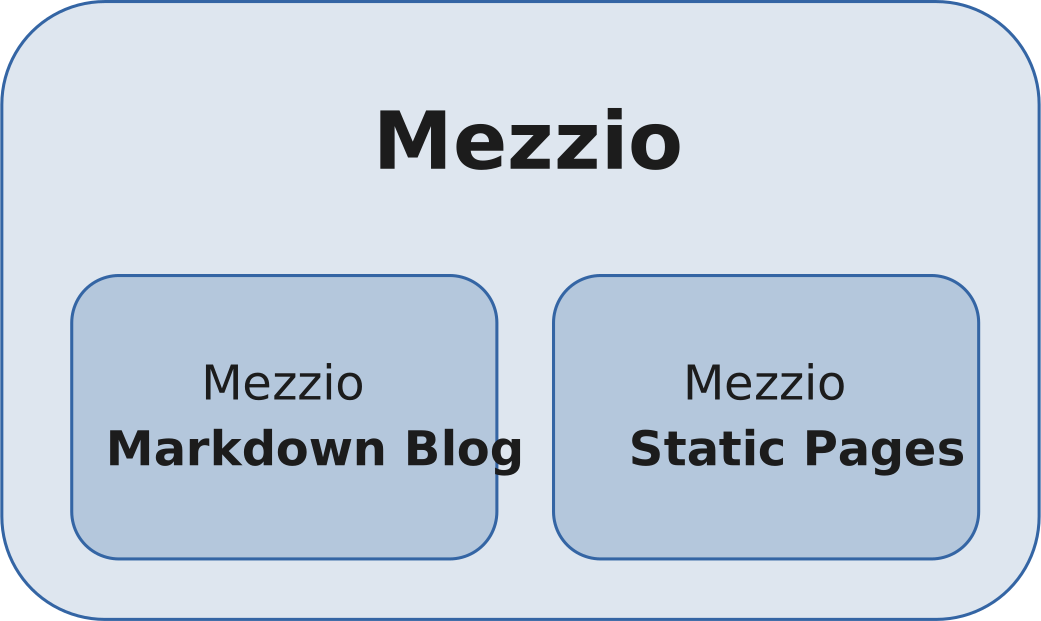
For the backend, while it (directly) uses 13 packages, it's based on just three.
Package 1: the Mezzio framework
This is my framework of choice, the one that I turn to more than any other. Sure, there are much more well known PHP frameworks, such as Laravel and Symfony, ones with much larger communities and ecosystems. And it's likely that you might expect, as I built the site in PHP, that one of them would be my first choice.
But, I've used Mezzio in its various versions for so many years now (it's the latest iteration of what was originally known as Zend Framework) and feel most at home using it. Plus, I wrote the book and the course on it. And, as you'll hear me say throughout this post quite a bit, it's often best to go with what you know — at least at first.
Package 2: Mezzio Markdown Blog
This is a package that I built (and continue to work on). It's a drop-in blogging component for Mezzio-based applications, one that needs very little configuration. Without going in to too much detail, it supports writing posts in Markdown, with YAML frontmatter for setting an article's metadata, e.g., the slug, title, etc.
Here's an example of what a source file might look like:
---
title: 10 Things I Learned Rebuilding My Website in PHP
author: Matthew Setter
synopsis: Recently, I rebuilt this website from scratch using PHP's Mezzio framework, moving away from static site generators that I've used for years. Here's why I did it and what I learned in the process.
publish_date: "2025-11-06"
slug: learnings-from-rebuilding-my-website-in-php
categories:
  - Software Development
tags:
  - PHP
  - Mezzio
  - Laminas
  - Static Site Generators
---

For the longest time, this site has been built with static site generators.
Originally, I used [Sculpin][sculpin], a PHP-based generator, before moving to [Hugo][hugo], which is written in Go.
I wrote it, perhaps subconsciously, for this website rebuild, so that it would be all but trivial to create a blog. I'd love your input and contributions if you're interested.
Now, while so much of the experience of using it has been overwhelmingly positive, there was one catch: the new blog's path structure.
I explained the situation in detail in a recent blog post, but here's the short version.
- The old version didn't have a well thought out URL structure
- The new version of the site uses FastRoute for its routing engine
Because of that, I needed to rewrite a number of URLs to ensure that I didn't lose the traction that I'd built up on the blog over the last several years.
Package 3: Mezzio Static Pages
This is another package that I wrote and maintain. It simplifies creating static pages for Mezzio-based applications. To put that in context, most websites have one or more pages, such as privacy policies, and disclaimers, etc, that don't have dynamic content; just static text.
When building sites without a CMS or static site generator, it might be more effort than it's worth to add such static pages. So, I created this package to create static pages quickly and easily, with only a template file, and a route in the application's routing table.
The frontend packages
Now, for the frontend packages, I largely focused on Tailwind CSS to simplify building the frontend. While there are a number of wonderful frontend frameworks available, Tailwind is the one that I like the most, and the one that I have the most experience with.
So, as I find to be so often the case, it pays to go with what you know, until it no longer meets your needs for one reason or another. This was helped along by having a copy of the excellent Refactoring UI by Adam Wathan and Steve Schoger (and spending countless hours practicing and experimenting over the last 12 - 18 months).
For what it's worth, the reasons that I use the framework, among others, are:
- It's easy to setup and integrate with a PHP project
- It has good tooling, making it easy to develop with
- It has excellent documentation and a growing ecosystem that you can draw upon
What did I learn rebuilding the site in PHP?
1. It's easier to rebuild a site with existing content
This is more of a feeling than a statement of fact. Here's why. When you're building a site from scratch, there are so many questions and so many unknowns that need to be addressed.
For example:
- Who is the site for?
- What are your users needs?
- Are you targeting desktop users, mobile users, or both?
- What's your build and operating budget?
- What resources do you have available?
- What technology stack will you use?
- How many pages will the site have?
- How will they be structured?
- What will the content of each page be?
- Will there be access requirements for one or more pages — or complete sections — of the site?
The list could easily become quite long...
When you're rebuilding an existing site, however, so many of these questions are likely already answered. For example, you already know who your users are. That said, the reasons for the rebuild may necessitate further questions, as well as changes to the answers to some of the questions you asked yourself before the previous iteration was built.
Gladly, in my case I didn't change a thing, as my motivation for rebuilding the site was a frustration with the existing implementation, and a desire to have a web project to work on over time, built in the language I most often use.
All I needed to do was to reimplement the existing structure, and use the existing content. The only thing I really thought about was a new site theme. Variety is the spice of life, and all that.
2. Some content is no longer relevant
While a lot of the content from the previous revision is still applicable, some of it, I feel, no longer is. Gladly, I took the time during the redesign planning phase to check what content could be culled and what should be refreshed.
Specifically, I will be rewriting the Services page from scratch, and reworking the About page, as soon as time permits. As the old saying goes, a change is as good as a holiday. And, a website redesign is a great opportunity to refresh a site's content.
3. Some things can happen quickly, but others take more time
Despite having the website structure and content available, and while that significantly reduced the amount of work required, it only reduced the workload so far. Rebuilding the site using a completely different approach brought with it its own set of unexpected challenges.
For example, one of the things that took the most amount of time was figuring out the deployment strategy. Previously, I had a very simple CI/CD (deployment) pipeline that used some of Hugo's tooling to build and deploy the site.
Now, as I built the site around Mezzio I had to figure out a custom deployment solution. Not to throw unintentional shade on Mezzio, but it doesn't provide deployment tooling, nor deployment services as part of its wider ecosystem, such as those that are available with Laravel and Symfony.
That makes sense when you consider the project's ethos. That being, it doesn't dictate the kind or type of application that you might want to build nor how you may want to build it.
However, being experienced with containers — and Docker in particular — and having deployed a number of sites to Fly.io already, I decided to use that combination of technologies to deploy the site.
I'll get into the specifics of how I did so in a future post.
Yet, even having this experience, it wasn't straightforward. For example, I had to:
- Read through Fly's documentation and experiment with functionality that I wasn't familiar with up until now.
- Do some trial and error with building the Dockerfile that packaged up the site into an image that could be deployed to Fly.io;
- Reimplement the CI/CD pipeline (a custom GitHub Action) so that it fit this new implementation
All that said, from a technical standpoint it was fun doing each of these things. But, it was also frustrating that I was able to build the site, locally, so quickly, but that deploying it took, seemingly, such a long time.
Even after I thought that I'd refined the process, I still had to keep making further refinements. That said, I'm happy with how it's currently setup to leave it as it is for the time being.
4. You don't have to have great design or frontend skills
This is a really subjective thing to say, as I'm not a professionally trained UI/UX designer. But, I don't feel that you need to have great design skills, nor do you need to be a guru with frontend technologies such as CSS and JavaScript to create a decent site design.
At least at first.
If you know the basics or are willing to learn them, which is easy enough when you have the right resources, and you're patient while you experiment and try new concepts and ideas, you can create a sufficiently professional design that you will be happy with. You may disagree, but I'm happy with the website's new design, which I created.
If you'd like to grow your design skills, some resources that I turn to on a regular basis are:
- Refactoring UI by Adam Wathan and Steve Schoger. I recommend buying the full package.
- MDN (The Mozilla Developer Network)
- CSS Tricks
- Figma
In addition to these resources, I'm reasonably sure that you know at least one designer or front-end legend who you could turn to with random questions. If not, I highly recommend Andy Denley, who I've worked with many times in the past.
All of this said, while I found it fun and rewarding — not to mention educational — to build the new site design myself, I accept that, at some point, I'll want to start working with a professional designer to create a truly engaging design.
5. Start with the technologies that you know
This is something that the older I get the more I appreciate. As I've largely only worked in tech for my professional career, I can't speak to other industries.
So, perhaps I'm wrong about this, but it seems to be a largely tech-related phenomena, that there is always some new and shiny technology. Consequently, anything that isn't new and shiny is seen as old and outdated, and of lesser value. So, tech stacks are often complicated and over-architected, which is seen as normal.
Rather, for this project, I wanted to keep it as simple as possible, and I wanted to get the site live as quickly as possible.
While life in tech (and in so many other fields) is a life of constant learning, I wanted to limit that as much as possible. Given that, I started with a limited set of technologies that I was already familiar with; those being:
- PHP 8.4 for the development language, along with the wonderful Composer
- Apache as the implementing web server
- Containers, powered by Docker and Docker Compose
- Git and GitHub (using GitHub Actions for the CI/CD pipeline)
- CSS, using Tailwind CSS as a frontend framework
- File formats, including YAML and JSON
6. There will be times when you have to be patient and read the docs
Most of the technologies in the previous point I already know quite well, but I didn't know GitHub Actions all that well. Sure, I had basic knowledge of it, having deployed sites with it previously, but that knowledge only went so deep.
For example, I could create a basic configuration for running QA tooling on PRs for PHP projects, using matrices to run the build on multiple operating systems and different versions of PHP. But, I wasn't, yet, familiar with job dependencies, along with a number of other concepts, concepts that I needed to have the Actions be as flexible and sophisticated as they needed to be. So, I had to read through the GitHub Actions documentation to better learn about how the technology is architected, what functionality is available, and some of the various ways that it can be composed.
Even though I've been building websites and other kinds of software for over 20 years, and I know it's a mistake to think this way, at times like this, when I just want something done, I often feel that I've stopped working. So, it was a good opportunity to push myself not to. Rather, to see it as just another aspect of development, one that's important, as if you don't know something, you have to take the time to learn it.
Sure, as is currently du jour, I could have asked ChatGPT to generate something for me, crossed my fingers that it worked, committed it and moved on. But, perhaps controversially in current times, what would I have learned by doing that?
I wouldn't have felt comfortable just taking code and using it without fully knowing what it was doing and why that approach was a good one — even the right one. Sure, I do take code snippets from places such as StackOverflow, but never blindly! What's more, I'd have learned all but nothing. So, call me stubborn, call me old-fashioned, call me pig-headed even, but I dove into the documentation, geeked out, and learned.
And, after all, learning is the core motivation for the rebuild. So, here is a golden opportunity to achieve that aim, one I didn't pass up.
For what it's worth: given what I've been reading about where GitHub is heading, I don't know how much longer I'll keep the source code and CI/CD pipeline there. But, for the time being, I'm happy with it.
7. Rely on third-party packages as much as possible
I can't stress this enough, at least for the first iteration: use what you know!
Sure, it's tempting to constantly try out new technologies — especially on greenfield projects — when you want to get a project out the door, resist the urge to do so.
This project reinforced for me that it's far better to finish the first iteration as quickly as possible using what you know. By doing so, you're less likely:
- To encounter issues that you don't know how to debug
- To get distracted trying out new technologies and concepts
To be fair, if you're using a new version of the underlying language (such as PHP 8.5 at the time of writing) then you can still get thoroughly distracted. However, by using well known and trusted technologies, you're more likely to just get in and get the project completed and shipped.
Later on though, if the need truly arises to use (or try out) a new technology or concept, such as feature flags, then go for it. But, for the first iteration I recommend keeping it as simple as possible.
8. Use QA tools extensively
This is another lesson that I appreciate so much more after this project.
I use QA tools (including PHPUnit, [PHPStan][phpstan], PHP Code Sniffer, and Codeception) as extensively as I can on every project I'm involved in. This is something that will never change! It was just heartening to feel further vindicated about this approach thanks to how much QA tools helped me find and address bugs.
One specific example was adding Codeception to the project to test that that the blog redirects worked. Sure, the most approach that I took might not be the most efficient, but it helped me uncover and fix bugs along the way. For example, while the initial version of the redirect configuration properly redirected requests from the old URL structure to new one, it also created an endless redirect loop for requests to the home page.
So, never skip this part! Use QA tools as extensively and as rigorously as you can. Doing so will pay you back many times over.
9. Plan out your CI/CD pipeline as early as possible
This is something that I've been thinking about for several projects. Mainly because it's easy to build a project locally, whether on a PC or a laptop, but getting the application live for anyone to use can be challenging. Well, to be fair to the Laravel community most of all, they make it pretty trivial with their expansive ecosystem, including tools such as Enjoyer and Forge.
In other communities, such as Laminas/Mezzio, it's not as easy. Again, to be fair, that's because a completely different ethos drives both communities. To dive into it for just a moment, as an outsider looking in, the Laravel community is hyper-focused around building (including deploying) a very well-defined type of applications.
Whereas Mezzio and Laminas don't dictate, in any way, the kind of application that you may build. They provide a lot of the tools that you may need to build any application that you may seek to, but don't dictate — in any way — what that application may be or how you might build it.
That can be a mixed blessing. On one hand, the available tooling doesn't scaffold base applications wired up with services and dependencies that you may never need. But, then the tooling and broader ecosystem are somewhat limited. For example, there isn't, — to the best of my knowledge — a service such as Envoyer or Forge. But then, I believe Forge is able to deploy virtually any kind of application. I've never used it, so I can't say for sure or from any personal experience.
Cutting a long story short, a lot of work falls on either yourself if you're the sole developer, or on one or more team members if you're working as part of a larger team. Said another way, you likely have to build a solution of your own, even if that's based on existing deployment tools such as Deployer or container-based platforms such as Fly.io that I use.
Given that, this project reinforced for me the need to plan out the deployment process, ensuring that it's included as an integral part of the process. This helps ensure that the application can be deployed as early as possible as well.
10. Keep a list of ideas that you want to work on (later!)
Now, just in case you think that I'm against new things or new ideas based on what I've said up until now, I'm not. I'm all for them, actually. I'm just against letting them run a project.
If you're always working on that next idea, that next concept, will the project ever ship? Ideas and features are great when kept in perspective, but they can't be what drives the project. You have to have discipline and work on them when it makes sense, or when you have the time to do so.
Sure, if you never make the time, you may never have the time. But, that's a sense of balance that I leave up to you to work out.
That's 10 Things I Learned Rebuilding My Website in PHP
With any new project — especially a new website — there is so much to do. But, if you focus on the right things, keep the technology stack simple and familiar, you'll get that first version out the door quicker with as little stress as possible. Then, you can play with new ideas and concepts.
This is the core of what I was reminded of rebuilding this website. I hope that it helps you with your next project, even if it isn't a website rebuild, or even uses PHP.