 Are you tired of hearing how "simple" it is to deploy apps with Docker Compose, because your experience is more one of frustration? Have you read countless blog posts and forum threads that promised to teach you how to deploy apps with Docker Compose, only for one or more essential steps to be missing, outdated, or broken?
Here's a little more background, so that this makes sense. I needed to install Redis, locally, for a Laravel application that I was testing out, and decided to use Docker Compose to simplify the process.
Sure, I could have built it from source, and configured it just the way I wanted it, but it wasn't worth the effort, when I could (I thought) create a 4-5 line Docker Compose configuration and run docker compose up -d instead.
So, that's what I started doing. You can see the initial configuration below.
services:
    redis:
        image: redis:7.2.2-alpine3.18
        ports:
            - "6379:6379"
The configuration defines one service, named redis, which is based on the 7.2.2-alpine3.18 tag of the official Docker Hub Redis image.
I thought that this was all that I'd need.
However, after running docker compose up -d, the following message was printed to the terminal:
no matching manifest for linux/arm64/v8 in the manifest list entries
While I'd never encountered this message previously, being somewhat familiar with multi-platform images, it seemed to me that the official image didn't include a build for Apple M1 CPUs.
Before we go further, if you're not familiar with what a manifest is, here's an excerpt from the Docker documentation:
A single manifest is information about an image, such as layers, size, and digest.
Anyway, after checking the supported architectures list, I was surprised to see arm64v8 (the applicable build for Apple Silicon) was listed.
Why would there be no matching manifest for arm64, when arm64 was listed?
Given that, I thought I'd try and use amd64 instead, as that's the generally accepted advice, if you're not sure.
If the host machine has a different architecture, an image can be emulated with qemu.
To do that, I added the platform directive to docker-compose.yml, as you can see in the revised configuration below.
services:
    redis:
        image: redis:7.2.2-alpine3.18
        platform: "linux/amd64"
        ports:
            - "6379:6379"
It didn't work either, nor did any of the other architectures. Each of them resulted in a similar error message being printed to the terminal.
At this point, I was pretty confused. It seemed like none of the listed architectures were supported.
So, how would I go about debugging the situation?
I thought it over for a little while, but came up short. Given that, I asked in the Docker Slack channel if anyone else had encountered the same issue, and what they did about it if they had.
During the discussion, I learned what was causing the issue. A corrupt image, one with no platforms in the manifest, was pushed to Docker Hub for that tag.
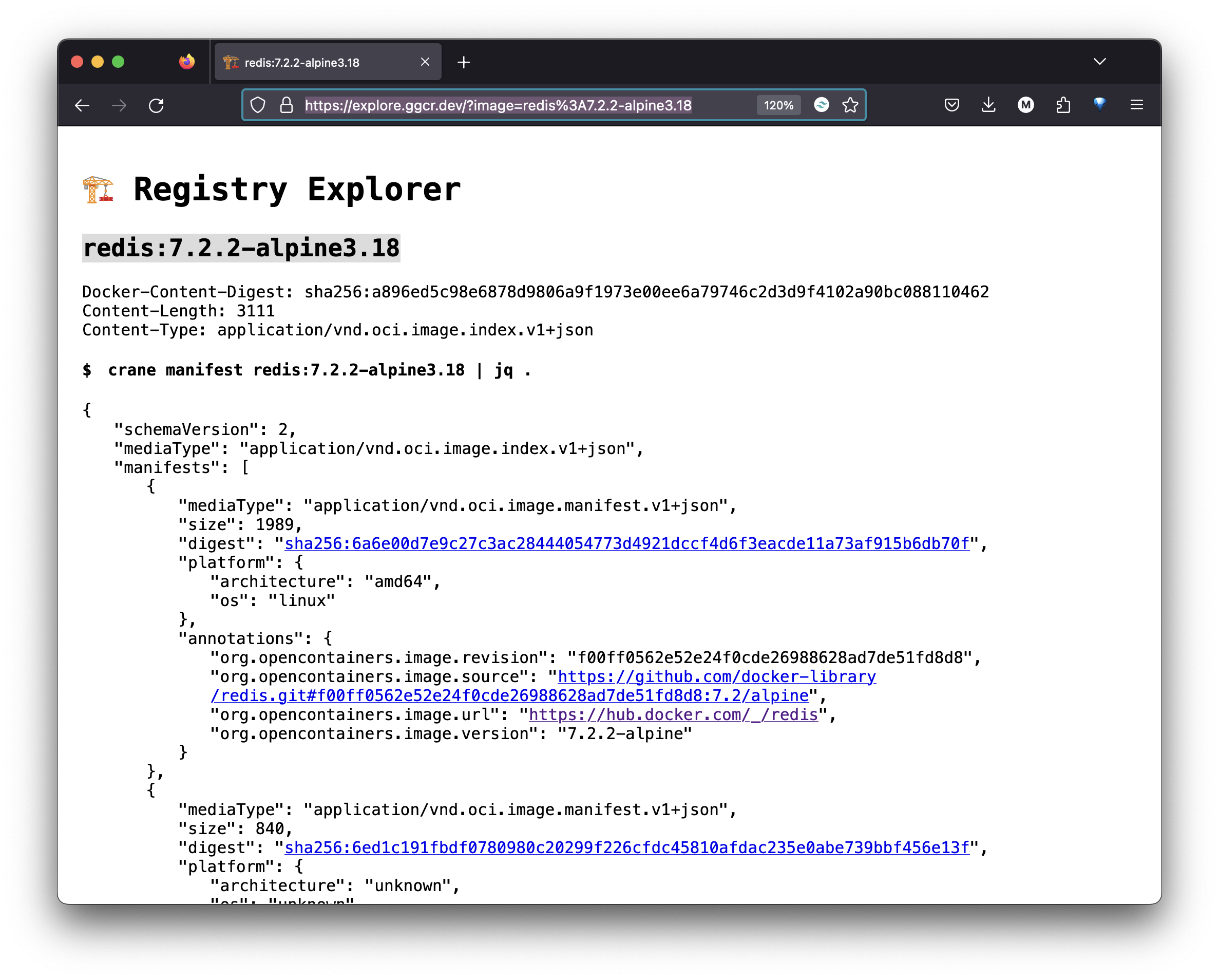
As a bonus, I learned about the Registry Explorer, a web-based tool that, in future, would help me debug images better on my own.
If you've not heard of it before, it's lets you (somewhat simplistically to be fair) explore the contents of a registry.
I say "somewhat simplistically" as supports just two options:
- Explore a repository: This returns the repository's full name and a list of all of the available image tags
- Explore an image: This returns the image's manifest. A manifest includes annotations, the supported platform, the image's digest, and size. Here are the details of the redis:7.2.2-alpine3.18.
It's a fun tool to use and, when I first used it, showed me that the manifests section for the image was empty, confirming the feedback I'd received in the Slack channel. However, as the image has been updated in the meantime, I can't show you what I saw.
That's it
If you need to debug an image in a public registry, and you're not show how, take a look at the Registry Explorer and see what it can tell you. There's not a lot to it, but it works for what it does.
Do you use it? Do you use something else? Share your approach in the comments.